ABYRITH
AN ATLAS OF THE LIVING WORLD
Return to the book ↗

THE RING / AN OPEN HORIZON

A world worth getting lost in.

70° LIGHT · CLOCKWISE

Dawn over Aurelion

FROM THE RING TO THE GROUND

Don’t just read the map.
Step inside it.

Choose a city. Descend through the light.
Find your own way across Aethergard.

WORLD

Drag to orbit · Scroll to descend · Right-drag to pan

ASSEMBLING AETHERGARD

The horizon is taking shape.

Mountains, cities, and a thousand glass leaves…

A NOTE ON THE RECONSTRUCTION

The book gives us a world.
The imagination gives it form.

This is an original, explorable 3D interpretation of Aethergard, guided by the manuscript, the world bible, the website’s Archive artwork, and the author’s corrections.

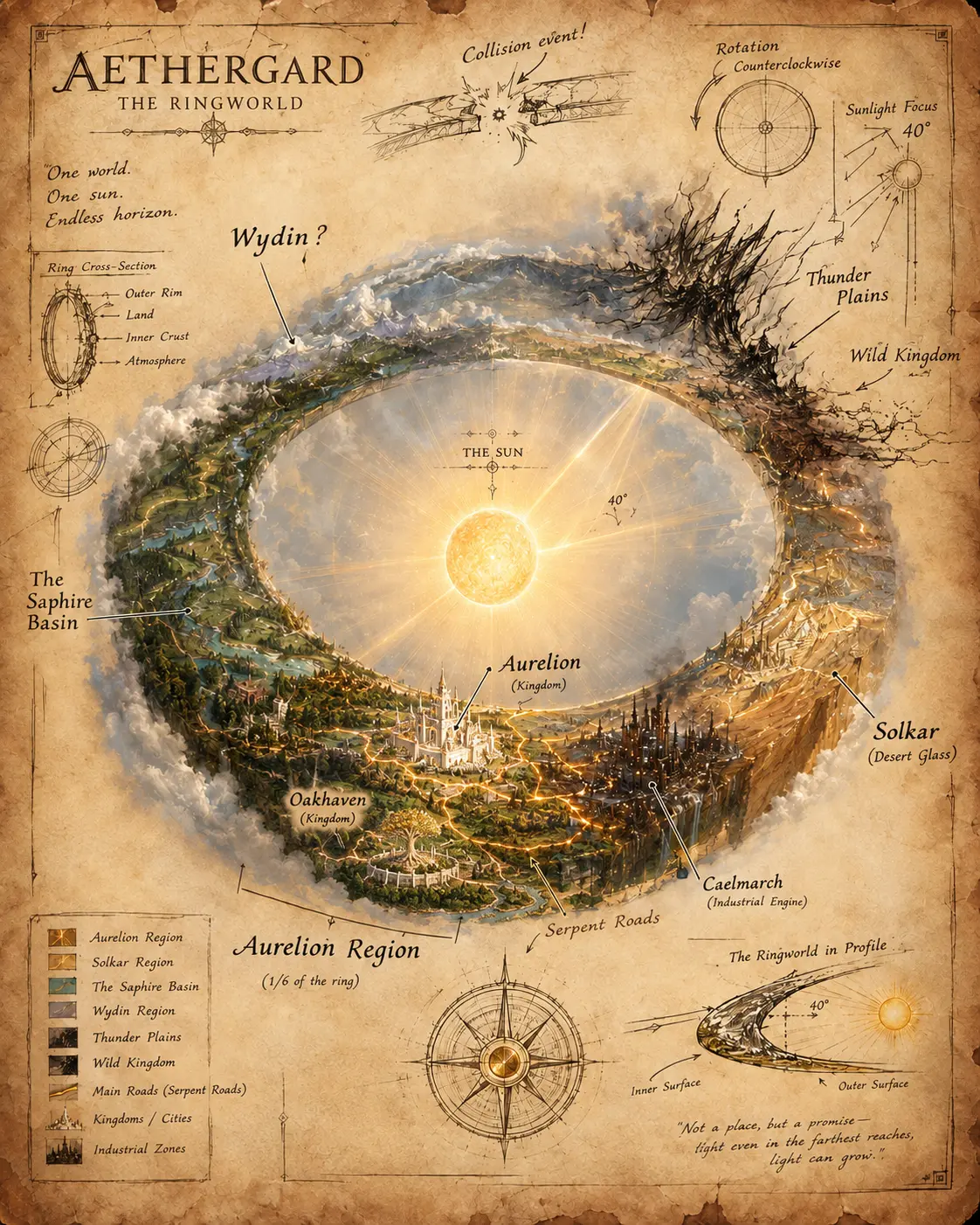
The Thunder Plains separate Solkar from the Wild Kingdom. Titanfall lies beside the Wild Kingdom in the Scorched Ridge. East Tower stands close to Caelmarch, on its sunward side. Twilight City occupies the former road marker. The Serpent Roads are drawn as infrastructure.

The inhabited world follows the inner curve of a ring, with cooler shoulders and mountain-bounded edges. The Darklands beyond the edge remain unshown. The world turns clockwise under a fixed 70° beam. Sunrise follows Aurelion → Solkar → Thunder Plains → Wild Kingdom → Wydin → Sapphire Basin.

Landscapes, building layouts, dimensions, and smaller details are artistic reconstructions, not measured geography. Unplaced kingdoms remain in the catalogue without invented positions. The Museum of Civilization is shown from outside, without its story content. The night effects are an atmospheric interpretation of desynchronization, without plot revelations. Quiet mode and optional sound are available.

World and Archive artwork © Dejan Davcevski.
Original 3D reconstruction for ABYRITH.
Three.js · MIT licence

FIND YOUR WAY

From the world to your footsteps.

Atlas
Drag to orbit. Scroll, pinch, or use + / − to zoom. Right-drag to pan. Select a place to centre it.
Descend
Zoom close to the terrain to enter hover mode automatically. Or choose Hover or Walk at any time.
Hover
WASD or arrow keys to move. E / Space to rise; Q to descend. Hold Shift to travel faster. Click “look around” for mouse look, or drag the view.
Walk
WASD or arrow keys to move along the ground. Buildings and the edge of the Ring stop your footsteps. Drag or use mouse look to turn.
On a phone
Use the movement pad with your left thumb and drag the scenery with your right. The up/down controls change altitude while hovering.
Return
Escape releases mouse look. Atlas or ⌖ returns you to the world. The light cycle continues while you walk or hover. Light cycle controls let you pause or choose a phase. Return to dawn brings back the light.